A good fit for short, focused clips
Choose 1.5 for a 5–30 second talking, singing or performance clip—especially if you already like the results you get from it.
Open the 1.5 generatorSee what actually changes between the two versions, watch the same idea made with both, and choose the one that fits your next video.
OmniHuman 1.5 and 2.0 can both turn an image and audio into a performed character video. Both can follow prompts for actions, emotion and camera direction. The easiest way to choose is audio length: 1.5 accepts 5–30 seconds here, while 2.0 accepts 4 seconds to 5 minutes.
Choose 1.5 for a 5–30 second talking, singing or performance clip—especially if you already like the results you get from it.
Open the 1.5 generatorChoose 2.0 when your audio is only 4–5 seconds or runs beyond 30 seconds. It currently supports videos up to 5 minutes on this site.
Open the 2.0 generatorIf your audio is 5–30 seconds, there is no automatic winner. Both versions can follow prompts and create expressive performances. Use the examples below as a starting point, then test both with your own image and a short section of audio.
Most everyday features are available in both versions. The table focuses on the differences that may change which generator you open.
| Comparison | OmniHuman 1.5 | OmniHuman 2.0 |
|---|---|---|
| What you uploadBoth versions | One image, one audio track and an optional prompt. | One image, one audio track and an optional prompt. |
| Audio lengthOn this site | 5–30 seconds—best suited to short clips. | 4–300 seconds—use it for very short clips or videos up to five minutes. |
| Guiding the performanceBoth versions | Prompts can describe actions, expressions, camera movement and events. | Prompts can describe actions, expressions, camera movement and events. |
| Without a promptBoth versions | Audio can drive speech, singing, expressions and natural movement. | Audio can drive speech, singing, expressions and natural movement. |
| People and other subjectsBoth versions | Works with people, animals and stylized characters. | Works with people, animals and stylized characters. |
| Multi-person scenesOn this site | Possible, but you cannot assign the audio to individual people in the current generator. | Possible, but you cannot assign the audio to individual people in the current generator. |
| Image requirementsBefore uploading | Check the accepted file details shown in the 1.5 uploader. | JPG, PNG, WebP and more, under 30 MB; 300–6,000 px; 0.4–2.5 aspect ratio. |
| CreditsSame price | 1 credit for each second of generated video. | 1 credit for each second of generated video. |
We made six videos with one reference image and one audio track. First we used no prompt, then added a sequence of actions, and finally added emotional direction. This makes the visible differences easier to judge.
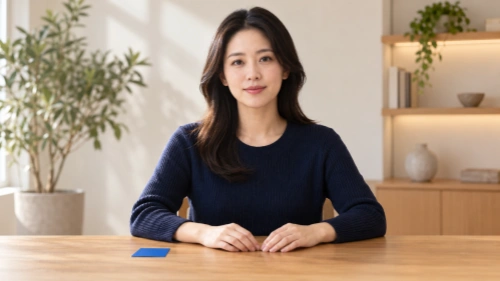
Only the version and prompt change. Each video shown is one generation, so treat the result as a useful example rather than a promise of identical behavior every time.
We started with the image and audio alone to see what each version would do naturally.
She speaks with natural head and hand movement. Her hand moves toward the blue card, but she does not pick it up or present it.
She uses light conversational gestures while the blue card stays on the desk throughout the video.
Both create a natural speaking performance, but neither turns the blue card into a clear presentation moment without being asked.
Next, we asked her to pick up the card, show it, put it down and finish with a small nod.
The woman speaks to the camera. During the first sentence, she keeps both hands resting on the desk. During the second sentence, she picks up the blue card with her right hand and holds it beside her face while continuing to speak. During the final sentence, she places the card back on the desk and gives one small confirming nod as she finishes speaking.
She picks up the blue card, holds it beside her face and returns it to the desk before the video ends. Most of the requested sequence appears in the right order.
Closer to the prompt in this exampleShe picks up the card and displays it beside her face, but she is still holding it when the video ends.
In this example, 1.5 completes more of the requested sequence from beginning to end.
Finally, we kept the actions and asked the expression to move from uncertain to optimistic and confident.
The woman speaks to the camera. During the first sentence, she keeps both hands resting on the desk and speaks with a thoughtful, slightly uncertain expression, briefly drawing her eyebrows together. During the second sentence, her eyes brighten and her expression becomes more optimistic as she picks up the blue card with her right hand and holds it beside her face while continuing to speak. During the final sentence, she places the card back on the desk, changes into a calm and confident smile, and gives one small confirming nod as she finishes speaking.
She displays the card, returns it to the desk and finishes calmly. The change in emotion is visible, but subtle.
Her expression moves more clearly from uncertainty to optimism and confidence. She also displays and returns the card before the final smile.
Closer to the prompt in this exampleIn this example, 2.0 shows the emotional change more clearly, while both versions complete the main card interaction.
Keep in mind: these are individual generations, not a guarantee that one version will always perform better. We did not compare camera movement, singing or multi-person scenes here.
Choose by the kind of video you are making. When both versions suit the length, your own image and audio will tell you more than the version number alone.
Make a 10–15 second test in both versions using the same image, audio and prompt. This is the most reliable way to compare facial detail, movement and prompt-following for your particular project.
Both generators use the same account credits at one credit per second of generated video. Start with the version that fits your audio length, or make a short clip in each.